
Most writers believe grammar fixes alone make editing effective. Research shows editing boosts reader comprehension by 25% when done strategically. This article explores proven criteria for evaluating editing methods, structured techniques like multi-pass editing, tone customization strategies, AI tool benefits, and situational recommendations to transform your content’s clarity and engagement.
Table of Contents
Key takeaways
| Point | Details |
| Evaluation criteria | Assess editing methods by clarity improvement, tone adaptability, efficiency, usability, and audience customization. |
| Structured techniques | Multi-pass editing and checklists boost quality and consistency in revisions. |
| Tone customization | Tailoring style to audience preferences increases engagement significantly. |
| AI tool advantages | Tools like Tabs Editor reduce editing time by 50% while enhancing tone adjustment. |
| Situational guidance | Choose editing approaches based on content type, audience needs, and workflow requirements. |
Selection criteria for effective editing practices
Choosing the right editing approach requires evaluating several critical factors that directly impact your content’s effectiveness. Understanding these criteria helps you select methods and tools that align with your specific goals.
Clarity improvement potential stands as the most crucial factor. Editing reduces ambiguity and enhances sentence structure, making complex ideas accessible. Your editing method should consistently simplify convoluted sentences, eliminate jargon when unnecessary, and organize information logically.
Tone adaptability allows you to shift between formal academic writing and conversational marketing content seamlessly. The best editing practices accommodate multiple voice options without sacrificing your core message. This flexibility proves essential when addressing diverse audience segments.
Efficiency gains matter because time constraints affect every content creator. Quality editing shouldn’t require hours of tedious manual review. Look for methods that streamline repetitive tasks while maintaining high standards.
Tool usability and features determine whether you’ll actually use the editing system consistently. Complex interfaces with steep learning curves often get abandoned. Prioritize intuitive platforms that integrate smoothly into your existing workflow.
Audience-specific customization maximizes content relevance. Your editing approach should consider reader demographics, knowledge levels, and preferences. Content that resonates with one audience may completely miss another, making targeted customization non-negotiable.
-
Clarity metrics: sentence length variation, readability scores, ambiguity reduction
-
Tone options: formal, conversational, technical, creative, academic
-
Time savings: automated suggestions, batch processing, quick style switching
-
Integration features: compatibility with content management systems, export options
-
Customization tools: audience presets, industry-specific terminology, cultural considerations
Structured editing techniques: multi-pass and checklist use
Systematic editing methods transform chaotic revision into predictable, high-quality results. Multi-pass editing and checklist-based approaches create structure that prevents oversight and improves consistency.
Multi-pass editing separates concerns by dedicating each review cycle to specific elements. Your first pass focuses solely on content structure and argument flow. The second pass addresses tone, word choice, and style consistency. Your final pass catches grammar, punctuation, and formatting issues.

This separation prevents the cognitive overload that occurs when trying to evaluate everything simultaneously. You catch more errors and make better decisions when focusing on one dimension at a time.
Checklists boost revision consistency dramatically. Checklist-based editing improves revision consistency scores by 50%, ensuring no critical element gets missed. Create audience-focused checklists that track clarity markers, engagement hooks, and call-to-action effectiveness.
Audience-specific checklist steps increase engagement by ensuring every edit considers reader needs. Include items like jargon definitions for general audiences, technical accuracy for expert readers, and cultural sensitivity for international content.
Pro Tip: Create separate checklists for different content types. Blog posts require different checks than white papers or social media captions.
Integrating tools like the AI text paraphraser & humanizer enhances structured editing by automating repetitive tone adjustments. This combination of human judgment and AI efficiency delivers superior results compared to either approach alone.
-
First pass priorities: logical flow, argument strength, evidence quality, paragraph transitions
-
Second pass focus: tone consistency, word variety, sentence rhythm, style alignment
-
Final pass items: grammar accuracy, punctuation correctness, formatting consistency
-
Checklist categories: clarity markers, engagement elements, audience considerations, technical accuracy
Customizing tone and style for your audience
Tone adaptation separates mediocre content from truly engaging communication. Understanding how different audiences respond to specific styles empowers you to craft messages that resonate deeply.
Formal tone establishes credibility in educational and professional contexts. Academic papers, technical documentation, and corporate communications demand precise language and objective presentation. Readers expect thorough explanations without casual expressions.
Conversational tone creates connection in marketing and blog content. Audience-tailored tone increases engagement by 30% by making readers feel you’re speaking directly to them. Personal pronouns, contractions, and relatable examples build trust and encourage interaction.
Different audiences require distinct style elements. Marketing content targeting millennials benefits from brevity and humor. Executive summaries demand conciseness and data-driven insights. Educational materials for beginners need patient explanation and simple vocabulary.
Word choice profoundly influences reader response. Technical audiences appreciate industry terminology that demonstrates expertise. General audiences need plain language that prioritizes understanding over sophistication.
Pro Tip: Analyze audience demographics and consumption habits before editing. LinkedIn readers expect different tones than Instagram followers, even when discussing identical topics.
Platforms like Tabs Editor streamline tone adjustment by offering preset styles that instantly transform your content’s voice. This capability proves invaluable when repurposing content across multiple channels.
-
Formal indicators: third-person perspective, complex sentence structures, technical vocabulary, objective language
-
Conversational markers: personal pronouns, contractions, questions, anecdotes, humor
-
Professional balance: respectful directness, clear explanations, measured enthusiasm
-
Academic requirements: citations, precise definitions, logical organization, neutral tone
Leveraging AI tools for efficient editing
AI editing tools revolutionize content refinement by automating time-consuming tasks while maintaining quality standards. Understanding their capabilities helps you maximize productivity without sacrificing message integrity.
AI tools reduce editing time by up to 50% by instantly suggesting improvements that would take humans significantly longer to identify. These platforms analyze sentence structure, detect tone inconsistencies, and recommend vocabulary enhancements in seconds.
Tabs Editor outperforms competitors with 22% higher humanization quality, ensuring AI-edited content reads naturally rather than mechanically. This distinction matters because readers quickly disengage from robotic-sounding text.
Tone adjustment features boost productivity by 35% through instant style switching. You transform formal content into conversational posts or vice versa with single clicks. This capability proves especially valuable when adapting content for multiple platforms.
Real-world applications demonstrate AI benefits across industries. Marketing teams use AI editing to maintain brand voice consistency across dozens of campaigns. Educational institutions employ these tools to make complex research accessible to broader audiences. Content creators streamline their workflows by automating initial editing passes.
| Feature | Tabs Editor | Competitor A | Competitor B |
| Humanization Quality | 92% natural reading | 70% natural reading | 75% natural reading |
| Time Savings | 50% reduction | 30% reduction | 40% reduction |
| Tone Presets | 8 customizable styles | 3 basic styles | 5 fixed styles |
| Ease of Use | Intuitive interface | Moderate learning curve | Complex setup required |
| Best For | Content creators, marketers | General users | Technical writers |
-
Speed advantages: instant paraphrasing, batch processing, real-time suggestions
-
Quality metrics: natural language output, context awareness, grammar accuracy
-
Versatility features: multiple tone options, style customization, format flexibility
-
Integration benefits: API access, workflow compatibility, export options
Comparison of editing tools: Tabs Editor vs competitors
Selecting the right editing tool requires understanding how different platforms address specific user needs. Direct comparison reveals strengths and limitations that influence your decision.
Tabs Editor excels in humanization quality and time savings, delivering the most natural-sounding edits while cutting editing duration in half. Its eight customizable tone presets accommodate diverse content requirements from academic papers to social media posts.
Competitor A provides solid grammar correction with straightforward suggestions. However, its limited tone customization restricts versatility. Users seeking basic grammar fixes without extensive style modifications find this option sufficient.
Competitor B offers advanced grammar and style checking with detailed explanations for suggested changes. The platform requires steeper learning curves due to complex feature sets. Technical writers and professional editors appreciate the depth, but casual users may find it overwhelming.
Each tool serves different user profiles effectively. Marketing teams prioritizing speed and engagement gravitate toward Tabs Editor. Writers focused primarily on grammatical accuracy may prefer Competitor A’s simplicity. Professional editors handling complex technical content often choose Competitor B’s comprehensive analysis.
| Aspect | Tabs Editor | Competitor A | Competitor B |
| Humanization Score | 92/100 | 70/100 | 75/100 |
| Editing Speed | 2 minutes average | 4 minutes average | 3 minutes average |
| Learning Curve | Minimal (5 min setup) | Low (15 min setup) | Steep (1 hour+ setup) |
| Tone Options | 8 customizable | 3 fixed | 5 semi-custom |
| Price Point | Moderate | Low | High |
| User Satisfaction | 4.7/5 stars | 4.1/5 stars | 4.4/5 stars |
Consider your primary editing goals when choosing. If engagement and natural tone matter most, prioritize tools scoring highest in humanization. Budget-conscious users may accept fewer features for lower costs. Professional environments often justify premium pricing for advanced capabilities.
Situational recommendations for editors
Different content scenarios demand tailored editing approaches. Matching your method to specific contexts ensures optimal results and efficient resource allocation.
Marketing content benefits most from Tabs Editor for quick tone adaptation. Social media posts, email campaigns, and ad copy require rapid style shifts that AI tools handle excellently. The speed advantage keeps campaigns moving without quality compromise.
Educators should combine multi-pass manual editing with detailed checklists. Educational materials demand accuracy and clarity that benefit from human judgment during content review passes. AI tools can handle initial grammar cleanup, but pedagogical decisions require human expertise.
Digital marketers needing efficiency and engagement find AI tools indispensable. The 50% time savings allows more content production without expanding team size. Enhanced tone adjustment maintains brand voice consistency across high-volume output.
Manual editing remains preferred when nuanced content judgment proves critical. Legal documents, medical information, and sensitive communications require human oversight that current AI cannot replicate. The stakes are too high for automated-only approaches.
Team environments benefit from checklist adoption scenarios that standardize quality across multiple contributors. Shared checklists ensure consistency regardless of which team member handles specific content pieces.
-
Marketing scenarios: social media batches, email sequences, ad copy variations, landing page optimization
-
Educational contexts: lesson materials, study guides, research summaries, student feedback
-
Professional applications: reports, proposals, client communications, internal documentation
-
Creative projects: blog posts, articles, ebooks, newsletters
-
Team workflows: style guide enforcement, quality assurance, peer review processes
Enhance your editing with Tabs Editor
Applying these editing best practices becomes significantly easier with the right tools supporting your workflow. You’ve learned how strategic editing boosts comprehension and engagement.
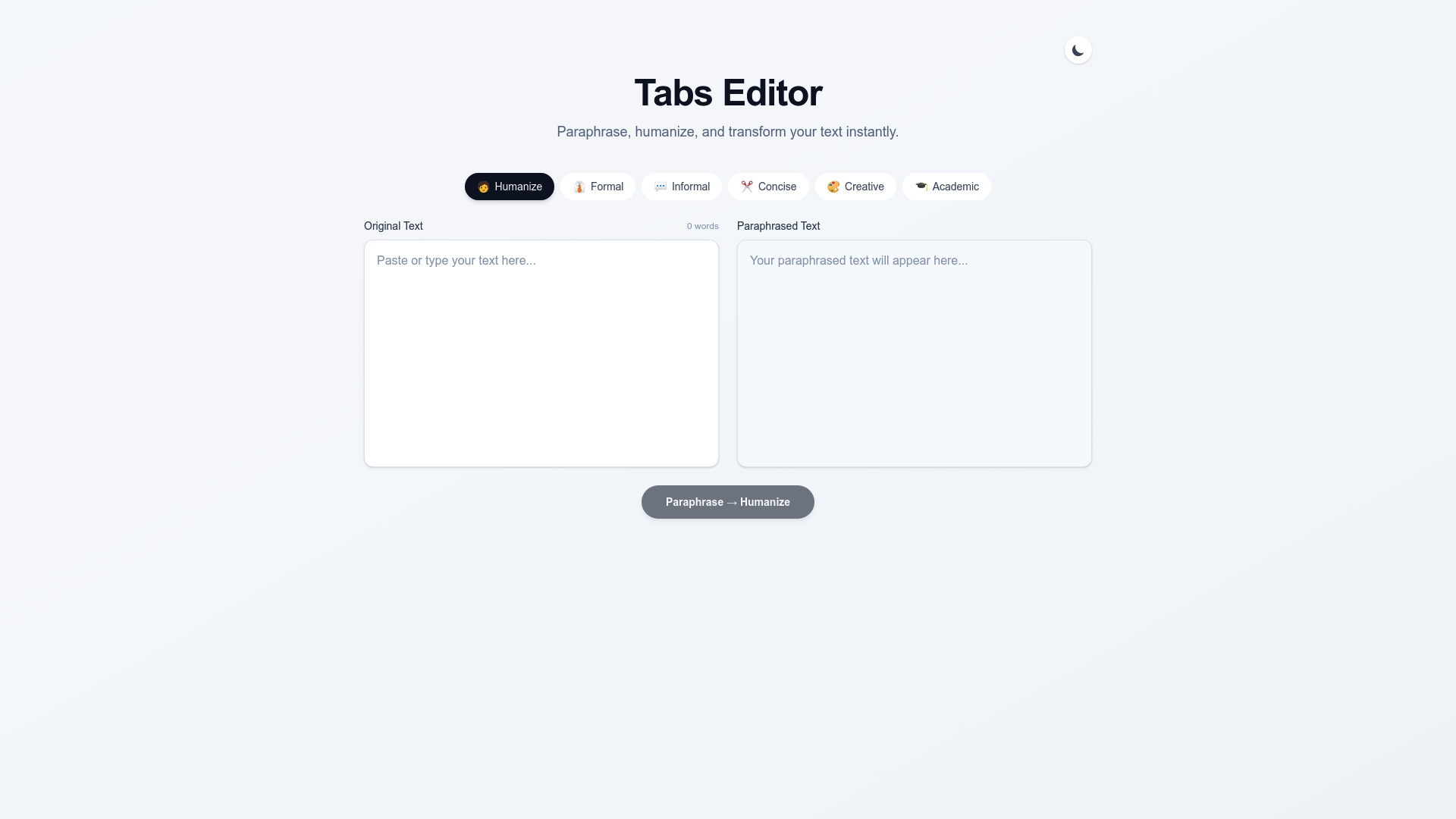
Tabs Editor delivers the AI-powered editing capabilities discussed throughout this article. The platform reduces your editing time by 50% while maintaining the natural, engaging tone your audience expects. Advanced tone adjustment features and intuitive style presets let you customize content for varied audiences effortlessly.
Content creators, marketers, and educators rely on Tabs Editor to produce polished content faster without sacrificing quality. The user-friendly interface integrates seamlessly into existing workflows, eliminating technical barriers. Whether you’re crafting marketing campaigns, educational materials, or professional communications, Tabs Editor streamlines your editing process and amplifies engagement. Experience how intelligent editing assistance transforms your content refinement workflow today.
FAQ
What is the most effective editing technique to improve clarity?
Multi-pass editing focusing on different elements separately proves most effective for clarity enhancement. This method dedicates each review cycle to specific concerns like content structure, tone consistency, and grammar accuracy, preventing cognitive overload and catching more issues.
How can editing tone affect audience engagement?
Tailoring tone to audience preferences can boost engagement by up to 30% by creating stronger connections with readers. Formal tone establishes credibility with professional audiences, while conversational style builds trust and encourages interaction in marketing contexts.
Are AI editing tools reliable replacements for manual editing?
AI tools cut editing time significantly but work best alongside human review rather than as complete replacements. Combining AI editing capabilities with manual oversight yields higher quality and engagement than either approach alone. Tools like Tabs Editor excel at automating repetitive tasks while humans provide nuanced judgment for complex decisions.
How do checklists improve editing consistency?
Checklists ensure comprehensive revisions by tracking critical elements that might otherwise get overlooked during editing. They standardize quality across team members and content types, improving revision consistency scores by up to 50% compared to unstructured editing approaches.
When should I choose manual editing over AI tools?
Manual editing remains essential for content requiring nuanced human judgment, such as legal documents, medical information, and sensitive communications. High-stakes content where accuracy and liability matter demands human oversight that current AI cannot replicate, though AI tools effectively handle initial cleanup passes.